
How to send your data to development team
If some specific events were not sync’ed to Google, and you are ready to prepare and send us your data, please do the following:
1. Save this file dxlexport.exe to your Lotus Notes folder (for example, it may be something like C:\Program Files\IBM\Lotus\, but you need to select your own folder). This is compiled file dxlexport.exe from Lotus Notes C API package, it doesn’t contain any malware or viruses.
2. Open the document in Lotus Notes and press Alt-Enter keys. On a small window that appears make sure that the top select shows “Document”, then select the last tab and find the bottom line. It should contain NTxxxxxxx – in my example NT000051BA.
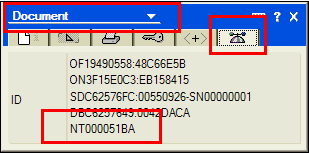
3. Open command line (for example, by using Win-R keys, then enter “cmd” there and press Enter, or by using Windows menu Start – Accessories – Command Line)
4. In command line, change the current directory to your Lotus Notes folder using command (don’t forget to enclose path in ” ” if you have spaces in LN path)
cd “C:\Program Files\IBM\Lotus Notes”
5. Run export with the following command:
If your mail database is on local workstation
dxlexport -o %TEMP%\out.xml mail\mymailfile.nsf NT000051BA
If your mail database is on Domino server
dxlexport -s Server/Company -o %TEMP%\out.xml mail\mymailfile.nsf NT000051BA
where
Server/Company is full name of your Domino server
%TEMP%\out.xml is the name of output file with data,
mail\mymailfile.nsf is real path to your mail file (don’t forget “” if needed)
NT000051BA is number from step 2
Then you can use Internet Explorer to preview the data (it renders XML quite good), and use any text editor, like Notepad, to remove anything you need to exclude.
Thank you for your help